Get Eyrie

Keep your family connected

Bring your family's phones, familiar places and everyday check-ins together. Start with your account, then follow the steps for each phone.

Start with your family account

One family. The right access for each person.

Create your account on the Eyrie website, verify your email and add your family. Already invited as a guardian? Follow the invitation from your family organiser to join their family.

Create your family account
iPhone & iPad

Set up your iPhone

Use Eyrie on the grown-up's phone and on the child's phone, with a different role for each.

  1. Install Eyrie, then choose whose phone you are setting up.
  2. Link the grown-up's phone to the account, or connect the child's phone with their pairing code.
  3. Review location and notification settings together, including background location on the sharing phone.
Download on the App Store

Follow the iPhone setup guide →

Need help finding or installing Eyrie? Ask for iPhone installation help.
Android

Set up your Android phone

Give the sharing phone the permissions it needs, then review your phone maker's background settings.

  1. Install Eyrie and choose the grown-up or child setup journey.
  2. Connect the phone using the correct account-link or child-pairing code.
  3. Review precise and background location, notifications and Eyrie's battery restrictions.
Get it on Google Play

Follow the Android setup guide →

Need help finding or installing Eyrie? Ask for Android installation help.

Your first day with Eyrie

Make the first check-in together

Have both phones with you. Open the child's card on the grown-up's phone, look at the latest update time and send an ordinary message. Ask the child to use I'm here so everyone understands what a check-in looks like.

Start with a familiar place such as home or school. Set a realistic arrival window, agree who follows up if a phone goes quiet, and keep your usual contact arrangements in place.

Screens use fictional demonstration data. Features and appearance vary by phone, plan and version.

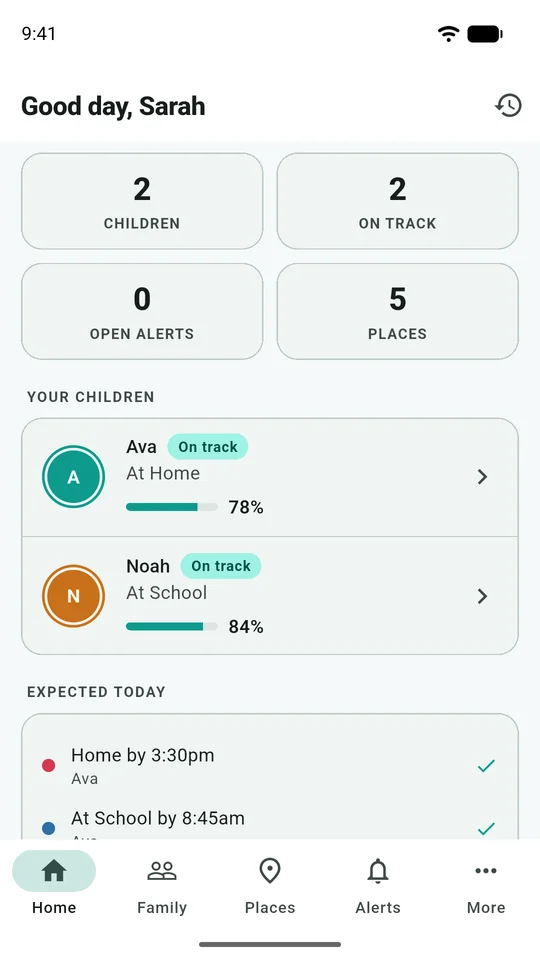
Eyrie Android family dashboard showing fictional children Ava and Noah, their battery levels and expected routines.
Family dashboardThe family dashboard brings together recent child status, battery levels and the day’s expected routines.

Understand the screen before relying on it

Explore the family map, places, routines, messages and SOS screen. Each example comes with practical guidance on how to interpret it.