Make room for a little more independence
A school arrival. A pickup after training. A quick ‘I'm here’. Eyrie brings those everyday moments into one place, so a family can coordinate with a little less uncertainty.
Useful reassurance starts with understanding
Knowing a phone's location can answer a practical question: has it reached school, or is it still on the way? That information works best alongside a conversation about why the family is sharing, who has access, and how everyone will use it.
Eyrie combines a family map, familiar places, routines, check-ins and text conversations. The child can see the sharing information on their phone. Guardians and trusted contacts have different roles, so families can choose the kind of help they need.
We build around those ordinary decisions. The goal is to make information easier to understand and family coordination easier to manage.
Start the family conversation →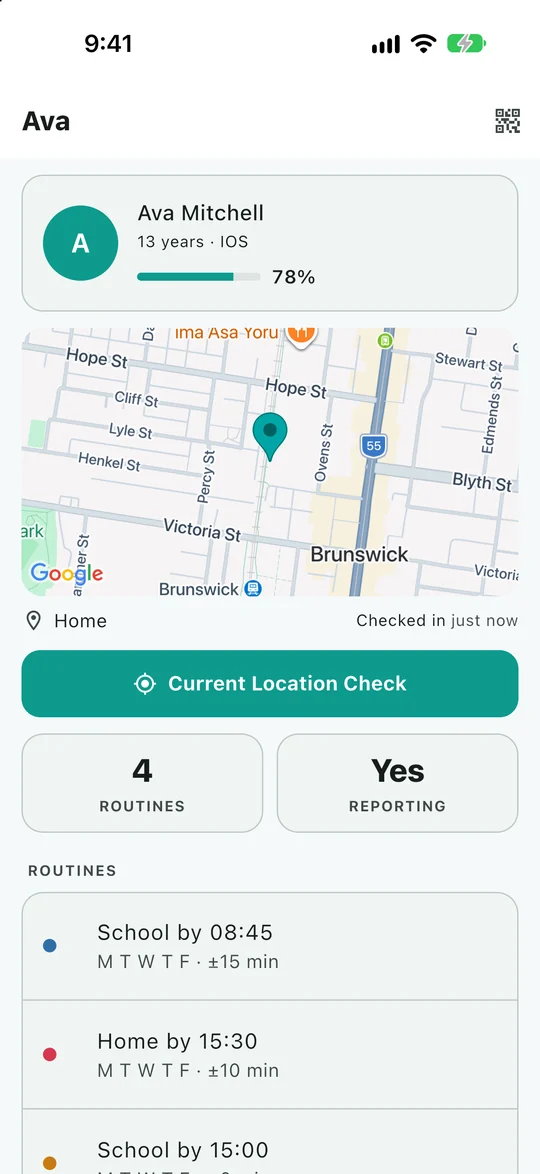
What shapes the product
Visible sharing
The person sharing location should understand what is shared and who can see it. Eyrie has no hidden mode.
Purposeful information
Location, check-ins and safety signals help a family coordinate. Eyrie does not use your family's account data for advertising.
Built in Australia
Eyrie is developed in Australia, with help available at [email protected]. We welcome questions and reports of things that need fixing.
Clear limits
A phone can lose signal, run out of battery or report an inaccurate position. We explain those limits alongside the features.
The explanation matters as much as the screen
“Last updated” and “current location” are easy to confuse. Battery controls differ between Android phones. An SOS can be sent while a receiving phone is offline. These details affect how families interpret the app, so they deserve clear explanations.
Our public guides cover setup, permissions, location accuracy, routines, messages and SOS. They are available without an account. The Eyrie team writes them from the app's screens and behaviour, with links to platform documentation where phone settings are involved.
The app tour uses original Android and iOS captures with fictional family data. We do not use customer locations or conversations in those examples. Guides show an update date, and we welcome corrections when a setting or screen changes.
Know what the app can tell you
A map pin is a report from a phone. It cannot guarantee someone is safe, and an SOS notification cannot guarantee help will arrive.
Use Eyrie alongside your family's usual ways to get in touch. If there is immediate danger, contact the emergency services where you are. Read our policies for the detail on data, access and acceptable use.
Ask us directly
For help with setup, a confusing screen or a guide correction, email [email protected]. Include your phone model and app version where useful; keep passwords and verification codes private.
Contact and privacy enquiries →